
Frecuently Used AWS CLI Commands
This is a collection of AWS CLI commands I put together while I was learning and that I still use as a reference


To enable SSH in Kali Linux and allow remote connections, follow these simple steps. By default, Kali comes with the OpenSSH server pre-installed, but it is disabled for security reasons.
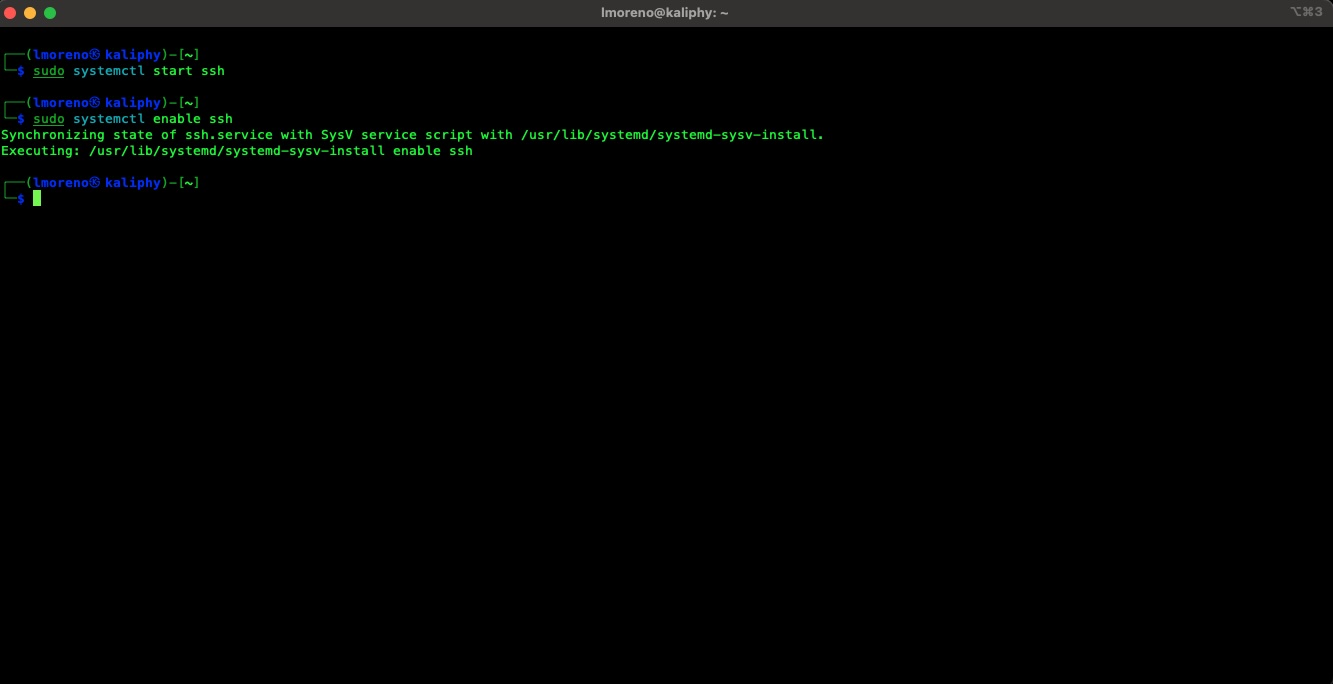
Open your terminal and run the following commands to start the service and configure it to launch automatically every time you power on your machine:
# Start the service immediately

sudo systemctl start ssh

# Enable the service to start at boot so you don't have to start it manually every time

sudo systemctl enable ssh
If you have the ufw firewall enabled on your Kali machine, you must allow traffic through port 22:
sudo ufw allow ssh
First, identify the IP address of your Kali machine:
ip a
(Look for the IP address under the eth0 or wlan0 section).
From another device (Linux/Mac/Windows PowerShell):
ssh your_kali_user@192.168.1.XX
This is a collection of AWS CLI commands I put together while I was learning and that I still use as a reference
This post originated from my personal notes while learning Linux back when there …